Your phone has a Do Not Disturb switch. Now the browser does too.
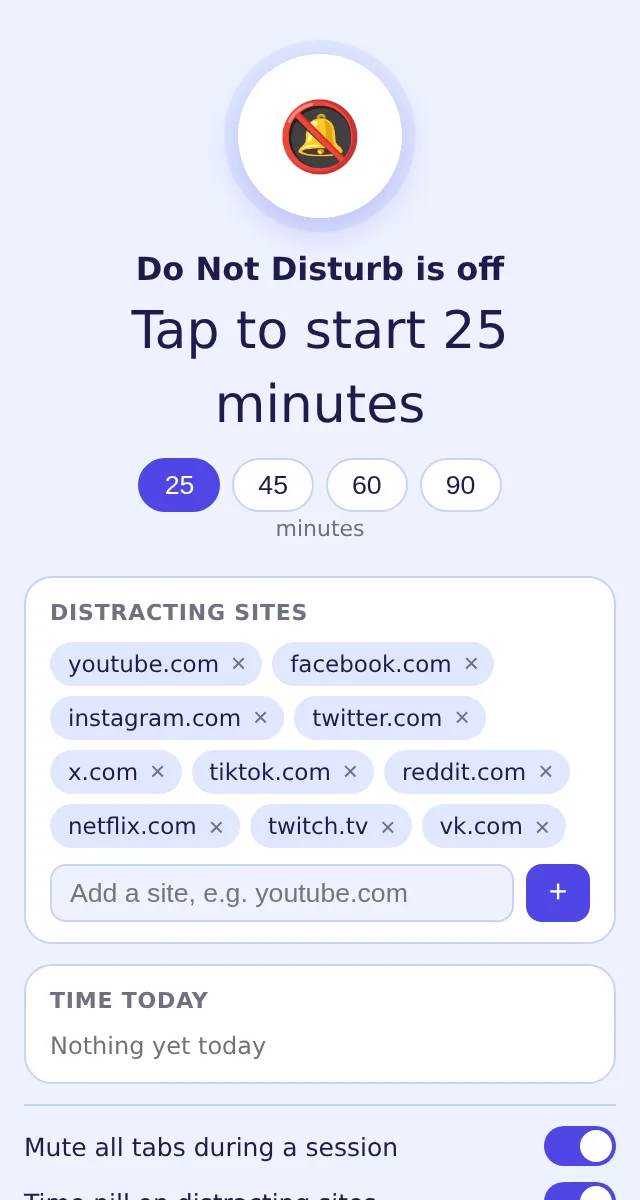
Press it for 25, 45, 60 or 90 minutes: every tab goes silent, the badge counts down, and the sites that eat your afternoons show a quiet screen with the time left instead of their feed. Everything runs on your device.
Add Do Not Disturb to Chrome — free
- Mutes all tabs, unmutes at the end
- Covers the sites you list — YouTube, social, streaming by default
- Counts time per site today, locally
The tab was supposed to be a two-minute check
You open the report, a notification sound comes from a tab you forgot, and twenty minutes later you are three videos deep. Blockers that need an account and a schedule feel like punishment; closing the tabs by hand lasts until the next ping. What you want is the thing your phone already has: a switch that says not now, for a while, and then lets go.
Pick a length, press the button
25, 45, 60 or 90 minutes. The badge starts counting down, every tab is muted, and the list of distracting sites — YouTube, Facebook, Instagram, X, TikTok, Reddit, Netflix, Twitch by default — is armed.
Distractions show a calm screen
Open one of those sites during the session and a full-page cover shows the remaining time instead of the feed. If you truly need it, take a 5-minute pass; if you are done early, stop with one click.
See the day's damage
On listed sites a small pill shows the minutes you have spent there today, counted while the tab is visible; the popup totals them per site. Add the site you are on to the list with one click.
What changes
Focus becomes a time box, not a battle of will: for the length you chose the browser is silent and the usual exits are closed, then everything returns to normal — tabs unmuted, sites open. The list, the session state and the daily minutes stay in chrome.storage on your device; there is no account, no schedule to configure and nothing uploaded.
Writing sprint
45 minutes before the draft is due. Button pressed, Slack tab muted, Reddit shows a countdown instead of the front page. The draft gets finished.
Exam week
Four 60-minute sessions a day. The pill on YouTube says 46 minutes today at lunch — enough to leave it covered for the evening.
The one necessary video
A tutorial lives on YouTube. The 5-minute pass opens it, the session continues, the cover comes back when the pass ends.
Compared with other ways of getting quiet
| Website blockers with schedules | Accounts, permanent rules, feel like a punishment | Do Not Disturb: A timed session you start when you need it, over when it ends |
|---|---|---|
| Closing tabs by hand | Reopened at the first notification sound | Do Not Disturb: All tabs muted, listed sites covered until the timer runs out |
| Pomodoro timers | Count the minutes, do nothing about the distractions | Do Not Disturb: Countdown plus muted tabs plus covered sites, in one button |
FAQ
How do I put Chrome in Do Not Disturb mode?
Click the extension, choose 25, 45, 60 or 90 minutes and press the big button. Tabs are muted and the sites in your list are covered until the time runs out or you stop the session.
Which sites are blocked?
By default YouTube, Facebook, Instagram, X/Twitter, TikTok, Reddit, Netflix, Twitch and VK. Remove any of them or add your own — the popup has a shortcut for the site you are on.
Can I open a covered site during a session?
Yes — the cover offers a 5-minute pass for that site. The session itself keeps running.
Does it mute videos and music too?
During a session every tab is muted, including media; everything is unmuted when the session ends. The mute can be switched off in the popup if you want the cover only.
Does it track my browsing?
It counts the time you spend on the listed sites today, on your device, and shows it in the pill and the popup. Nothing is sent anywhere. The cover, the pill and the totals are free; starting the first few sessions is included and ExtSpace Pro removes that limit.

Do Not Disturb
Free Chrome focus mode: one tap mutes every tab, counts down on the badge and covers YouTube, social and streaming sites with a calm screen for 25, 45, 60 or 90 minutes. Time per site today, 5-minute pass, no account.
Add Do Not Disturb to Chrome — free Unit Converter